Running a small business is challenging enough without constantly worrying about missing stock, misplaced products, unexpected shortages, or money tied up in items that nobody is buying. Whether you operate a retail shop, wholesale business, hardware store, mini-supermarket, electronics shop, or small distribution company, keeping track of your inventory is one of the most important parts of running a profitable business.
Imagine a customer walks into your shop looking for a product you believe is available. You check the shelves, look through your storage area, and eventually discover that the item was sold several days ago but never recorded. Now you have an unhappy customer and a sale you could have made.
Or perhaps you order 50 units of a product because you think you are running low, only to discover that you already have 40 units sitting in your storeroom.
These situations are more common than many business owners realize.
The good news is that managing stock does not have to be complicated or expensive. With proper organization, consistent record-keeping, and reliable inventory management software, even a small business can maintain accurate stock records and make better purchasing decisions.
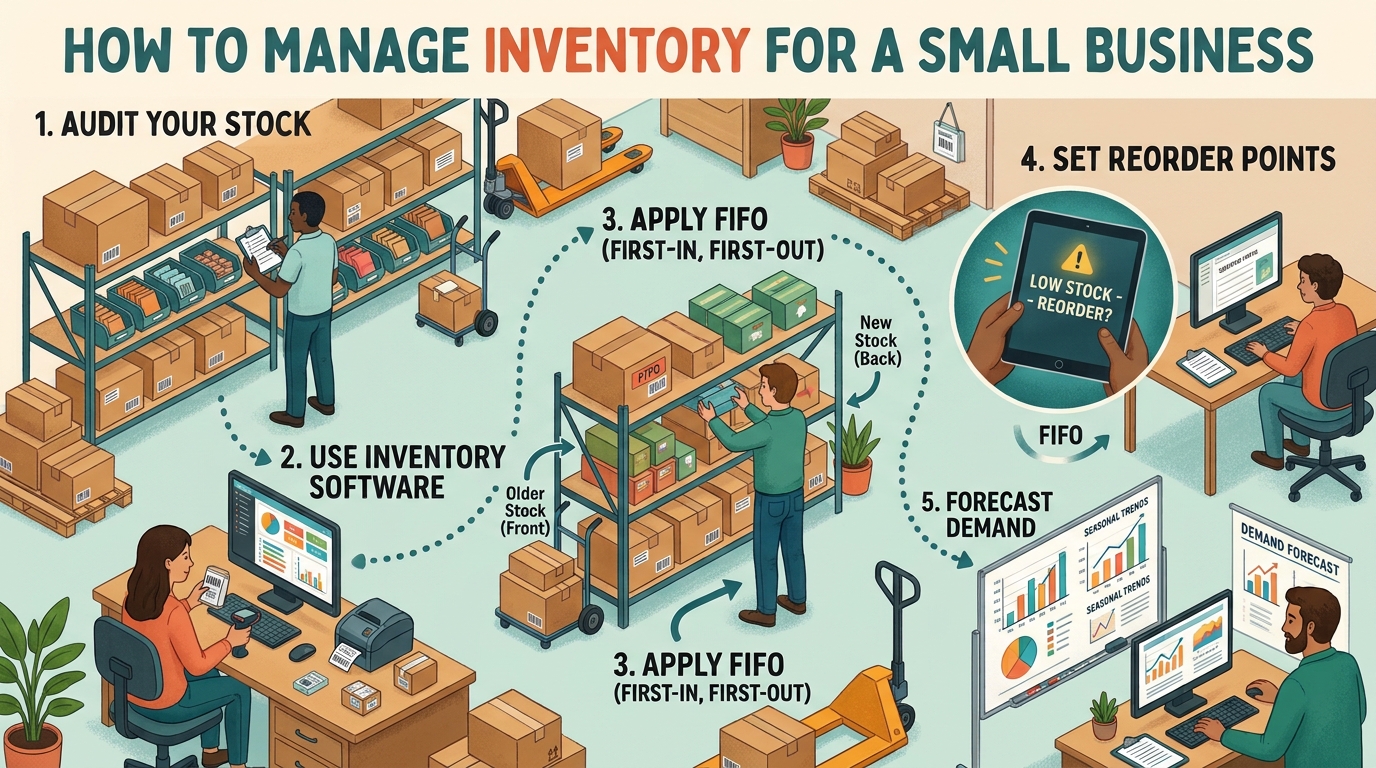
In this guide, we will explain how to manage inventory for a small business, from organizing your product catalog and tracking stock movements to managing suppliers, preventing stockouts, calculating inventory value, and understanding which products make your business money.
We will also look at how tools such as LedgerBizz Inventory can simplify these everyday tasks.
1. Organize Your Products and Create a Proper Inventory Catalog #
Before you can manage inventory effectively, you need to know exactly what your business sells and how much stock you have.
Many small businesses start by keeping product information in notebooks, spreadsheets, or handwritten price lists. This might work when you have only 10 or 20 products, but it becomes increasingly difficult as your business grows.
You may have products with similar names, different sizes, multiple variations, or changing purchase and selling prices. Without a proper product catalog, identifying items and checking their availability becomes unnecessarily difficult.
Start by creating a complete list of the products you sell.
For each product, record the following information:
- Product name.
- Product category.
- Unique product code or SKU.
- Barcode, where applicable.
- Purchase price.
- Selling price.
- Current stock quantity.
- Minimum stock level.
- Product description.
- Product image, if useful.
For example, imagine you operate a small electronics shop selling chargers, earphones, keyboards, computer mice, and phone accessories.
Instead of recording everything under a general category called Accessories, create individual product records.
You could have:
| Product | Buying Price | Selling Price | Opening Stock |
|---|---|---|---|
| USB-C Charger | KSh 450 | KSh 800 | 30 |
| Wireless Mouse | KSh 650 | KSh 1,100 | 20 |
| Wired Earphones | KSh 180 | KSh 350 | 50 |
| USB Keyboard | KSh 700 | KSh 1,200 | 15 |
This makes it easier to identify products, compare prices, calculate stock value, and monitor sales.
Use product codes and barcodes where possible.
A product code helps you distinguish between similar items. Barcodes make the process even faster because employees can scan products instead of searching through long product lists.
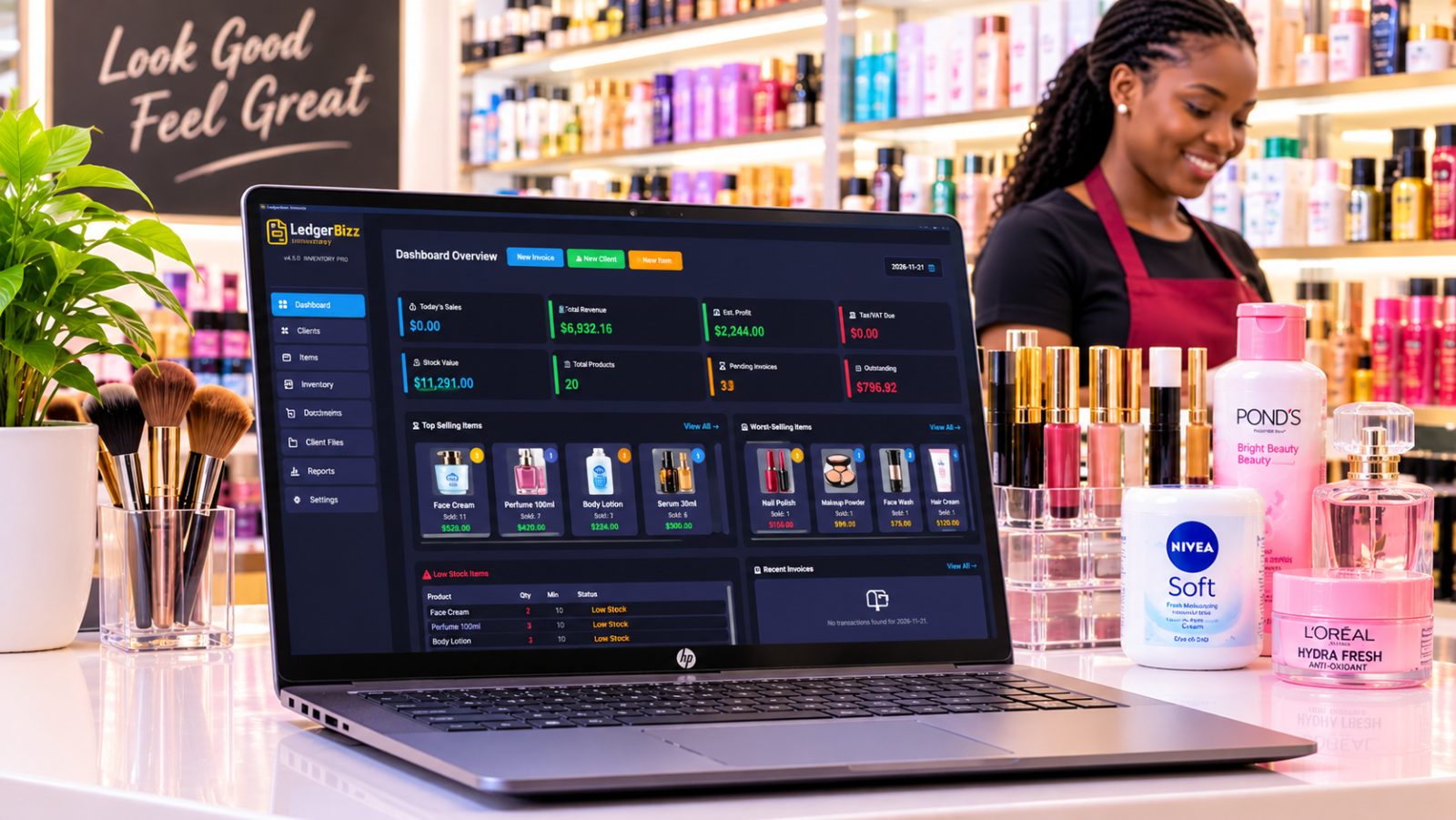
LedgerBizz Inventory provides an item catalog where you can maintain product information, buying and selling prices, product images, minimum stock levels, and automatically generated barcode labels.
It also supports USB barcode scanners, allowing you to look up products, add items to invoices, and conduct stock audits more efficiently.
The goal is simple: every product should have a clearly identifiable record.
2. Record Every Stock Purchase and Sale #
One of the biggest inventory management mistakes is failing to record stock movements immediately.
A business might record purchases but forget to update sales. Another might record sales but fail to account for damaged products, returned items, or stock taken for internal use.
Over time, these small mistakes create significant differences between the quantities shown in business records and the actual stock available.
For example, imagine your records show that you have 100 bottles of cooking oil.
During the week:
- You sell 25 bottles.
- You receive another 40 bottles from a supplier.
- Three bottles are damaged.
- You use two bottles for business purposes.
Your expected stock should be:
100 + 40 - 25 - 3 - 2 = 110 bottles.
If you only record purchases and sales, your system might show 115 bottles. That means you have five bottles that cannot be accounted for.
This is why every stock movement should be documented.
Your inventory records should account for:
- New purchases from suppliers.
- Products sold to customers.
- Customer returns.
- Damaged or expired products.
- Internal business consumption.
- Stock transfers between storage locations, where applicable.
- Approved manual stock adjustments.
Connect stock records to your sales process.
Whenever possible, use an invoicing system that automatically deducts sold products from inventory.
This eliminates the need to update stock quantities manually after every transaction.
LedgerBizz Inventory automatically deducts stock when products are sold through its invoicing process. Similarly, receiving stock through purchase orders updates the available inventory.
It also provides inventory movement records, helping you track purchases, sales, damages, and manual adjustments.
This makes it easier to investigate differences and understand what happened to your stock.
A good rule is to record transactions as they happen rather than waiting until the end of the day or week.
3. Set Minimum Stock Levels and Prevent Stockouts #
Have you ever had to turn away a customer because a product was unavailable?
Stockouts can cost a business more than the immediate sale. A customer who repeatedly finds their preferred product unavailable might eventually decide to shop elsewhere.
However, ordering too much stock is not the solution.
Excess inventory ties up money that could be used for rent, salaries, marketing, or purchasing faster-moving products. It also consumes storage space and increases the risk of damage, expiry, or obsolescence.
The solution is to establish minimum stock levels for your products.
A minimum stock level is the quantity at which you should consider purchasing more stock before running out.
For example:
| Product | Current Stock | Minimum Level | Action |
|---|---|---|---|
| Cooking Oil | 12 | 20 | Reorder |
| Sugar | 45 | 25 | No action |
| Rice | 8 | 15 | Reorder |
| Washing Powder | 30 | 10 | No action |
In this example, cooking oil and rice need attention because their current quantities are below the minimum stock levels.
But how do you decide what minimum quantity to use?
Consider three things:
Average daily sales: How many units do you normally sell each day?
Supplier delivery time: How long does it take for your supplier to deliver new stock?
Safety stock: How many extra units should you keep to protect against unexpected demand or delivery delays?
For example, if you sell five packets of rice daily and your supplier takes four days to deliver, you need approximately 20 packets to cover normal demand during that period. You may want to keep additional safety stock.
A simple formula is:
Reorder Point = Average Daily Sales × Supplier Lead Time + Safety Stock.
If daily sales are five units, delivery takes four days, and you want 10 units as safety stock:
Reorder Point = (5 × 4) + 10 = 30 units.
You should consider placing a new order when stock reaches 30 units.
Use low-stock alerts to avoid relying on memory.
LedgerBizz Inventory allows you to assign minimum stock levels to individual products and monitor low-stock alerts from its dashboard.
Instead of checking every product manually, you can quickly identify items that need replenishment.
This is particularly useful for retailers, wholesalers, and distributors handling many different products.
4. Manage Suppliers and Use Purchase Orders #
Your suppliers play a major role in determining how efficiently your business operates.
A reliable supplier helps you maintain stock availability, while poor purchasing decisions can lead to delays, unexpected expenses, and unnecessary stock shortages.
Unfortunately, many small businesses manage supplier relationships through scattered WhatsApp messages, handwritten notes, and phone calls.
Although these methods can be convenient, they make it difficult to maintain a complete purchasing history.
Start by creating a supplier directory.
Record important information such as:
- Supplier or company name.
- Contact person.
- Phone number.
- Email address.
- Physical address.
- Products supplied.
- Previous purchase transactions.
- Agreed purchasing prices.
You should also maintain records of every purchase order.
A purchase order (PO) is a document issued to a supplier requesting specific products and quantities at agreed prices.
For example, your hardware shop might need:
| Product | Quantity | Unit Cost | Total |
|---|---|---|---|
| Paint Brushes | 50 | KSh 120 | KSh 6,000 |
| Paint Rollers | 30 | KSh 250 | KSh 7,500 |
| Masking Tape | 40 | KSh 90 | KSh 3,600 |
| Total | KSh 17,100 |
Having this information documented helps you confirm what you ordered, compare supplier prices, and verify deliveries.
When the supplier delivers the products, check the quantities and condition before accepting the delivery.
If you ordered 50 paintbrushes but received only 45, your records should reflect what was actually received.
Avoid simply assuming that everything on the purchase order was delivered.
How LedgerBizz Inventory helps with purchasing
LedgerBizz Inventory includes supplier management and a dedicated purchase order module.
You can maintain supplier records, create professional purchase orders, and receive stock through the purchasing process.
When stock is received, the system updates inventory quantities and recalculates weighted average costs.
This creates a more organized purchasing process and makes it easier to review previous supplier transactions when planning future orders.
5. Calculate Inventory Value and Understand Your Actual Profit #
Selling products does not automatically mean your business is making money.
You need to understand how much the products cost you, how much revenue they generate, and what remains after accounting for the cost of goods sold.
One common mistake among small business owners is assuming that the difference between the current selling price and the last purchase price represents the exact profit on every sale.
This can be misleading when you purchase the same product at different prices.
For example, imagine you buy 10 bags of rice at KSh 2,000 each.
A week later, your supplier increases the price, and you purchase another 10 bags at KSh 2,200 each.
Your total purchasing cost is:
- First purchase: 10 × KSh 2,000 = KSh 20,000.
- Second purchase: 10 × KSh 2,200 = KSh 22,000.
- Total cost: KSh 42,000.
- Total quantity: 20 bags.
Your average purchase cost is:
KSh 42,000 ÷ 20 = KSh 2,100 per bag.
If you sell a bag for KSh 2,600, your gross profit per bag, using this average cost, is KSh 500.
This is an example of the Weighted Average Cost (WAC) method.
Weighted Average Cost helps businesses account for changing purchase prices when valuing inventory and calculating the cost of goods sold.
Why does this matter?
Suppose you sell 15 bags at KSh 2,600 each.
Your sales revenue is KSh 39,000.
Using the average cost of KSh 2,100:
Cost of Goods Sold = 15 × KSh 2,100 = KSh 31,500.
Gross Profit = KSh 39,000 - KSh 31,500 = KSh 7,500.
This is gross profit before expenses such as rent, salaries, transport, electricity, and other operating costs.
Monitor product profitability, not just sales revenue.
A product generating high sales might not necessarily be your most profitable product.
For instance, one product might generate KSh 100,000 in monthly sales but leave you with a very small margin. Another might generate KSh 40,000 in sales with a much healthier margin.
LedgerBizz Inventory supports Weighted Average Cost calculations when receiving stock through purchase orders.
Its reporting tools help you monitor stock valuation, sales trends, Cost of Goods Sold (COGS), and profit margins.
This information helps you identify products that deserve more attention and those that might need a price review.
6. Conduct Regular Stock Audits and Review Inventory Reports #
Even with good inventory software, physical stock checks remain important.
A stock audit involves comparing the quantities recorded in your inventory system with the actual products available in your shop or warehouse.
For example, your system might show 75 packets of sugar, but a physical count reveals only 70.
You now have a difference of five packets that needs investigation.
Possible explanations include:
- Sales that were not recorded.
- Damaged products.
- Incorrect quantities entered during purchases.
- Theft or unauthorized stock removal.
- Data entry mistakes.
- Incorrect stock adjustments.
Do not simply change the system quantity to match the physical count without understanding why the difference occurred.
Investigating discrepancies helps you identify weaknesses in your business processes.
Create a regular stock-counting schedule.
For a small business, you could use the following approach:
- Fast-moving products: Check weekly.
- Expensive products: Check weekly or more frequently.
- General inventory: Conduct a monthly review.
- Slow-moving products: Review monthly or quarterly.
The exact schedule depends on the size and nature of your business.
You should also use inventory reports to understand what is happening beyond physical quantities.
Some useful reports include:
Stock valuation reports: Show how much money is tied up in your inventory.
Sales reports: Help identify products generating the most revenue.
Profitability reports: Help you understand the relationship between sales revenue and product costs.
Inventory movement reports: Show how stock enters and leaves your business.
Low-stock reports: Highlight products that may require replenishment.
LedgerBizz Inventory includes stock movement tracking, inventory valuation, sales analysis, and advanced reporting tools. You can also export comprehensive inventory and financial reports to Excel for further analysis.
These reports make it easier to plan purchases, review business performance, and make decisions based on actual records rather than assumptions.
7. Use Inventory Management Software to Simplify Daily Operations #
You can manage a small inventory using a notebook or spreadsheet when your product range is limited.
However, as your business grows, manual processes become increasingly time-consuming.
Consider what happens when you have 500 products, several suppliers, dozens of daily transactions, and employees handling sales.
You need a reliable way to:
- Maintain product records.
- Track stock quantities.
- Record purchases.
- Deduct sold products automatically.
- Manage supplier information.
- Generate invoices and receipts.
- Identify low-stock products.
- Calculate inventory value.
- Monitor product profitability.
- Maintain transaction histories.
- Back up business records.
Trying to perform all these tasks manually increases the risk of errors and consumes time that could be spent serving customers or growing the business.
This is where inventory management software becomes useful.
What should you look for in an inventory management system?
Not every business needs an expensive enterprise solution.
A small business should look for software that is affordable, easy to operate, and capable of handling its daily activities.
Here are some important features to consider.
1. Automatic stock tracking
Your software should update stock quantities when you record purchases and sales. This reduces repetitive manual work.
2. Purchase order management
You should be able to prepare purchase orders, maintain supplier records, and record received stock.
3. Barcode support
Barcode scanning makes it easier to identify products, prepare invoices, and perform stock counts.
4. Inventory valuation
The system should help you understand how much your available inventory is worth.
5. Sales and profit reports
You need reports that help you identify sales trends, product costs, and profitability.
6. Data backup and recovery
Your inventory records are valuable business information. Choose software that provides reliable backup and restore options.
7. Offline functionality
If your business experiences unreliable internet connectivity, offline software can be particularly useful.
How LedgerBizz Inventory supports small businesses
LedgerBizz Inventory is a desktop-based inventory management solution designed for retailers, wholesalers, warehouses, and distributors.
It brings several everyday business activities into one system.
Its main capabilities include:
- Real-time inventory tracking with automatic stock additions and deductions.
- Product catalog management with buying prices, selling prices, images, and minimum stock levels.
- Purchase order creation and supplier management.
- USB barcode scanner integration and printable barcode labels.
- Automatic invoicing, receipts, quotations, delivery notes, and credit notes.
- Inventory movement records and audit trails.
- Weighted Average Cost calculations.
- Stock valuation and sales analytics.
- Excel import and export.
- Scheduled automatic backups and restore functionality.
- Email automation for sending business documents to customers.
One important advantage is that LedgerBizz Inventory operates offline.
Your inventory records are stored locally on your computer, so you do not need a constant internet connection to manage stock, create invoices, or generate reports.
This can be particularly helpful for businesses operating in areas where internet connectivity is unreliable or for owners who prefer keeping their business records under their control.
The software also offers a 10-day free trial, allowing you to explore its basic inventory management capabilities before purchasing a license.
Final Thoughts: Take Control of Your Business Inventory #
Good inventory management is not just about knowing how many products are sitting on your shelves.
It is about knowing what you have, what you need to order, what is selling, what is not selling, how much your stock is worth, and whether your products are generating a profit.
Start with the basics. Organize your product catalog, record every stock movement, monitor minimum quantities, maintain supplier records, and conduct regular stock audits.
As your business grows, consider introducing software that automates repetitive tasks and gives you a clearer picture of your stock and sales performance.
If you want a simpler way to handle these responsibilities, take a look at LedgerBizz Inventory.
It combines product management, purchasing, barcode scanning, invoicing, stock tracking, inventory valuation, and business reporting in one offline desktop application.
Ready to manage your stock with more confidence?
Explore LedgerBizz Inventory, download the 10-day free trial, and discover how it can help you organize your stock, reduce manual work, and make better business decisions.